Tutorial
Knowing how to set up valid YAML configuration files is fundamental to properly use MLWiz. Custom behavior with more advanced functionalities can be generally achieved by subclassing the individual modules we provide, but this is very much dependent on the specific research project.
Data Preprocessing
The ML pipeline starts with the creation of the dataset and of the data splits. The general template that we can use is the following, with an explanation of each field as a comment:
splitter:
  splits_folder:  # folder where to store the splits
  class_name:  # dotted path to splitter class
  args:
    n_outer_folds:  # number of outer folds for risk assessment
    n_inner_folds:  # number of inner folds for model selection
    seed:
    stratify:  # target stratification: works for classification tasks only
    shuffle:  # whether to shuffle the indices prior to splitting
    inner_val_ratio:  # percentage of validation for hold-out model selection. this will be ignored when the number of inner folds is > than 1
    outer_val_ratio:  # percentage of validation data to extract for risk assessment final runs
    test_ratio:  # percentage of test to extract for hold-out risk assessment. this will be ignored when the number of outer folds is > than 1
dataset:
  class_name:  # dotted path to dataset class
  args:  # arguments to pass to the dataset class
    arg_name1:
    arg_namen:
  # pre_transform:  # transform data and store it at dataset creation time. Can be a string or a class + args as below
  transform_train: # on the fly transforms for training data
    - class_name: mlwiz.data.transform.ConstantIfEmpty
      args:
        value: 1
  transform_eval: # on the fly transforms for validation and test data
    - class_name: mlwiz.data.transform.ConstantIfEmpty
      args:
        value: 1
Data Splitting
We provide a general Splitter class that is able to split a dataset of multiple samples. The most important parameters
are n_outer_folds and n_inner_folds, which represent the way in which we want to perform risk assessment
and model selection. For instance:
n_outer_folds=10andn_inner_folds=1: 10-fold external Cross Validation (CV) on test data, with hold-out model selection inside each of the 10 folds,
n_outer_folds=5andn_inner_folds=3: Nested CV,
n_outer_folds=1andn_inner_folds=1: Simple Hold-out model assessment and selection, ortrain/val/testsplit.
We assume that the difference between risk assessment and model selection is clear to the reader. If not, please refer to Samy Bengio’s lecture (Part 3).
Here’s an snippet of a potential configuration file that splits a classification dataset:
splitter:
  splits_folder: examples/DATA_SPLITS/
  class_name: mlwiz.data.splitter.Splitter
  args:
    n_outer_folds: 3
    n_inner_folds: 2
    seed: 42
    stratify: True
    shuffle: True
    inner_val_ratio: 0.1
    outer_val_ratio: 0.1
    test_ratio: 0.1
Dataset Creation
To create your own dataset, you should implement the DatasetInterface interface.
Here’s an snippet of a potential configuration file that downloads and processes the MNIST classification dataset:
dataset:
  class_name: mlwiz.data.dataset.MNIST
  args:
    storage_folder: DATA/
You can also apply transform_train/transform_eval and pre_transform to process the samples at runtime or at dataset creation time, respectively.
Once our data configuration file is ready, we can create the dataset using (for the example above)
mlwiz-data --config-file examples/DATA_CONFIGS/config_NCI1.yml
Experiment Setup
Once we have created a dataset and its data splits, it is time to implement our model and define a suitable task.
Every model must implement the ModelInterface interface.
At this point, it is time to define the experiment. The general template that we can use is the following, with an explanation of each field as a comment:
# Dataset and Splits
storage_folder:  # path to DATA root folder (same as in data config file)
dataset_class:  # dotted path to dataset class
data_splits_file:  # path to data splits file


# Hardware
device:  # cpu | cuda
max_cpus:  # > 1 for parallelism
max_gpus: # > 0 for gpu usage (device must be cuda though)
gpus_per_task:  # percentage of gpus to allocate for each task
gpus_subset: # optional, comma-separated list of gpu indices, e.g. 0,2. Used to force a particular subset of GPUs being used.


# Data Loading
dataset_getter:  # dotted path to dataset provider class
data_loader:
  class_name:  # dotted path to data loader class
  args:
    num_workers :
    pin_memory:
    # possibly other arguments (we set `worker_init_fn`, `sampler` and `shuffle`, so do not override)


# Reproducibility
seed: 42


# Experiment
result_folder:  # path of the folder where to store results
exp_name:  # name of the experiment
experiment:  # dotted path to experiment class
higher_results_are_better:  # model selection: should we select based on max (True) or min (False) main score?
evaluate_every:  # evaluate on train/val/test every `n` epochs and log results
risk_assessment_training_runs:  # how many final (model assessment) training runs to perform to mitigate bad initializations
model_selection_training_runs:  # how many training runs to perform for each hyper-parameter configuration in a specific inner fold
training_timeout_seconds:  # optional max time (in seconds) for a single training run (-1 disables the timeout)

# Grid Search
# if only 1 configuration is selected, any inner model selection will be skipped
grid:
  model:  # dotted path to model class
  checkpoint:  # whether to keep a checkpoint of the last epoch to resume training
  shuffle:  # whether to shuffle the data
  batch_size:  # batch size
  epochs:  # number of maximum training epochs

  # Model specific arguments #

  # TBD by you

  # ------------------------ #

  # Optimizer (with an example - 3 possible alternatives)
  optimizer:
    - class_name: mlwiz.training.callback.optimizer.Optimizer
      args:
        optimizer_class_name: torch.optim.Adam
        lr:
          - 0.01
          - 0.001
        weight_decay: 0.
    - class_name: mlwiz.training.callback.optimizer.Optimizer
      args:
        optimizer_class_name: torch.optim.Adagrad
        lr:
          - 0.1
        weight_decay: 0.

  # Scheduler (optional)
  scheduler: null

  # Loss metric (with an example of Additive Loss)
  loss:
    - class_name: mlwiz.training.callback.metric.AdditiveLoss
      args:
        loss_1: mlwiz.training.callback.metric.MulticlassClassification
        loss_2: mlwiz.training.callback.metric.MulticlassClassification

  # Score metric (with an example of Multi Score)
  scorer:
    - class_name: mlwiz.training.callback.metric.MultiScore
      args:
        main_scorer: mlwiz.training.callback.metric.MulticlassAccuracy
        my_second_metric: mlwiz.training.callback.metric.ToyMetric

  # Training engine
  engine: mlwiz.training.engine.TrainingEngine

  # Gradient clipper (optional)
  gradient_clipper: null

  # Early stopper (optional, with an example of "patience" early stopping on the validation score)
  early_stopper:
    - class_name:
        - mlwiz.training.callback.early_stopping.PatienceEarlyStopper
      args:
        patience:
          - 5
        # SYNTAX: (train_,validation_)[name_of_the_scorer_or_loss_to_monitor] -> we can use MAIN_LOSS or MAIN_SCORE
        monitor: validation_main_score
        mode: max  # is best the `max` or the `min` value we are monitoring?
        checkpoint: True  # store the best checkpoint

  # Plotter of metrics
  plotter: mlwiz.training.callback.plotter.Plotter
Data Information
Here we can specify some information about the dataset:
storage_folder: DATA
dataset_class: mlwiz.data.dataset.MNIST
data_splits_file:  examples/DATA_SPLITS/MNIST/MNIST_outer3_inner2.splits
Hardware
Here we can define how many resources to allocate to parallelize different experiments:
# this will run a maximum of 4 experiments to allocate all of the 2 gpus we have.
# We use some more cpu resources to take into account potential `data loader workers <https://pytorch.org/docs/stable/data.html#multi-process-data-loading>`_.
device:  cuda
max_cpus:  8
max_gpus: 2
gpus_per_task:  0.5
Data Loading
Here we specify which DataProvider we want to use to load the data associated with the
given splits, and the DataLoader that needs to handle such data:
# Data Loading
dataset_getter: mlwiz.data.provider.DataProvider
data_loader:
  class_name: torch_geometric.loader.DataLoader
  args:
    num_workers : 2
    pin_memory: True  # should be True when device is set to `cuda`
Experiment Details
Here we define the experiment details, including the experiment name and type, and the folder where we want to store our results:
result_folder: RESULTS
exp_name: mlp
experiment: mlwiz.experiment.MLP
higher_results_are_better: True
evaluate_every: 3
risk_assessment_training_runs: 3
model_selection_training_runs: 2
training_timeout_seconds: -1  # set to a positive value to enforce a per-run time budget
By default MLWiz will run each training session until either the configured number of epochs is reached or the early
stopper halts it. If you need to cap the wall-clock time of each run, set training_timeout_seconds to a positive
value. The TrainingEngine tracks the elapsed time (including previous attempts when
resuming from checkpoints) and stops scheduling additional epochs once the limit is reached, logging the reason for the
interruption. Keeping checkpointing enabled lets you safely resume from where the timeout was triggered.
Grid Search
Grid search is identified by the keyword grid after the experimental details. This is the easiest setting, in which
you can define lists associated to an hyper-parameter and all possible combinations will be created. You can even have
nesting of these combinations for maximum flexibility.
There is one config file examples/MODEL_CONFIGS/config_MLP.yml that you can check to get a better idea.
Random Search
Random search, on the other hand, is identified by the keyword random after the experimental details. One line above
we have to specify the number of random trials, using the keyword num_samples.
- We provide different sampling methods:
choice –> pick at random from a list of arguments
uniform –> pick uniformly from min and max arguments
normal –> sample from normal distribution with mean and std
randint –> pick at random from min and max
loguniform –> pick following the reciprocal distribution from log_min, log_max, with a specified base
There is one config file examples/MODEL_CONFIGS/template_random_search.yml that you can check to get a better idea.
Experiment
Once our experiment configuration file is ready, we can launch an experiment using (see below for a couple of examples)
mlwiz-exp --config-file examples/MODEL_CONFIGS/config_MLP.yml
or
mlwiz-exp --config-file examples/MODEL_CONFIGS/config_MLP.yml
And we are up and running!
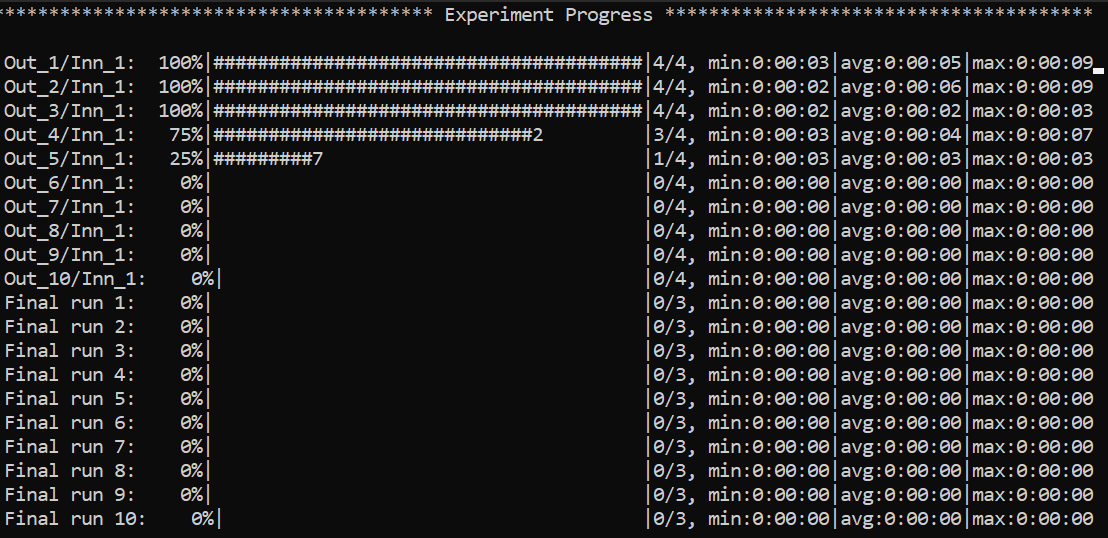
Some things to notice: because we have chosen a 3-fold CV for risk assessment with a 2-fold CV for model selection for
each external fold, you can notice in the picture there are 3*2 rows with Out_*/Inn_* written. For each of these,
we have to perform a model selection with 4 possible hyper-parameters’ configurations (progress shown on the right handside),
and each model selection experiment is run model_selection_training_runs times to mitigate the effect of bad initializations.
In addition, there are also some stats about the time required to complete the experiments.
After the 3 model selection are complete (i.e., one “best” model for each outer/external fold), it is time to re-train
the chosen models on the 3 different train/test splits. Therefore, you can notice 3 rows with Final run * written.
Since we have specified risk_assessment_training_runs: 3 in our exp. config file, we will mitigate unlucky random initializations
of the chosen models by averaging test results (of a single outer fold) over 3 training runs. The final generalization
performances of the model (a less ambiguous definition would be: the class of models you developed) is obtained,
for this specific case, as the average of the 10 test scores across the external folds. Again, if this does not make sense
to you, please consider reading Samy Bengio’s lecture (Part 3).
Navigating the live progress UI
The progress screen is interactive. Press : to open the small prompt in the bottom-right corner, type a command, and
hit Enter to switch what is rendered without stopping the run. Useful commands:
:(or:g/:global): go back to the default overview with all progress bars.:r(or:refresh): redraw the currently selected view (handy if the terminal layout gets messy).:<outer> <run>(e.g.,:1 2): focus the risk assessment run numberrunof outer foldouter(numbers start at 1).:<outer> <inner> <config> <run>(e.g.,:2 1 3 1): focus a model selection run for a specific config inside an outer/inner fold pair.
Global overview (default view):
If an identifier is invalid or the run has not produced updates yet, MLWiz will print a short hint and keep listening so you can try again.
You can also use the arrow keys:
left/right: move across runs/configurations within the currently selected view.
up/down: toggle between the most recently visited model selection view and risk assessment view.
Focused run view (same as what you see when running with --debug):
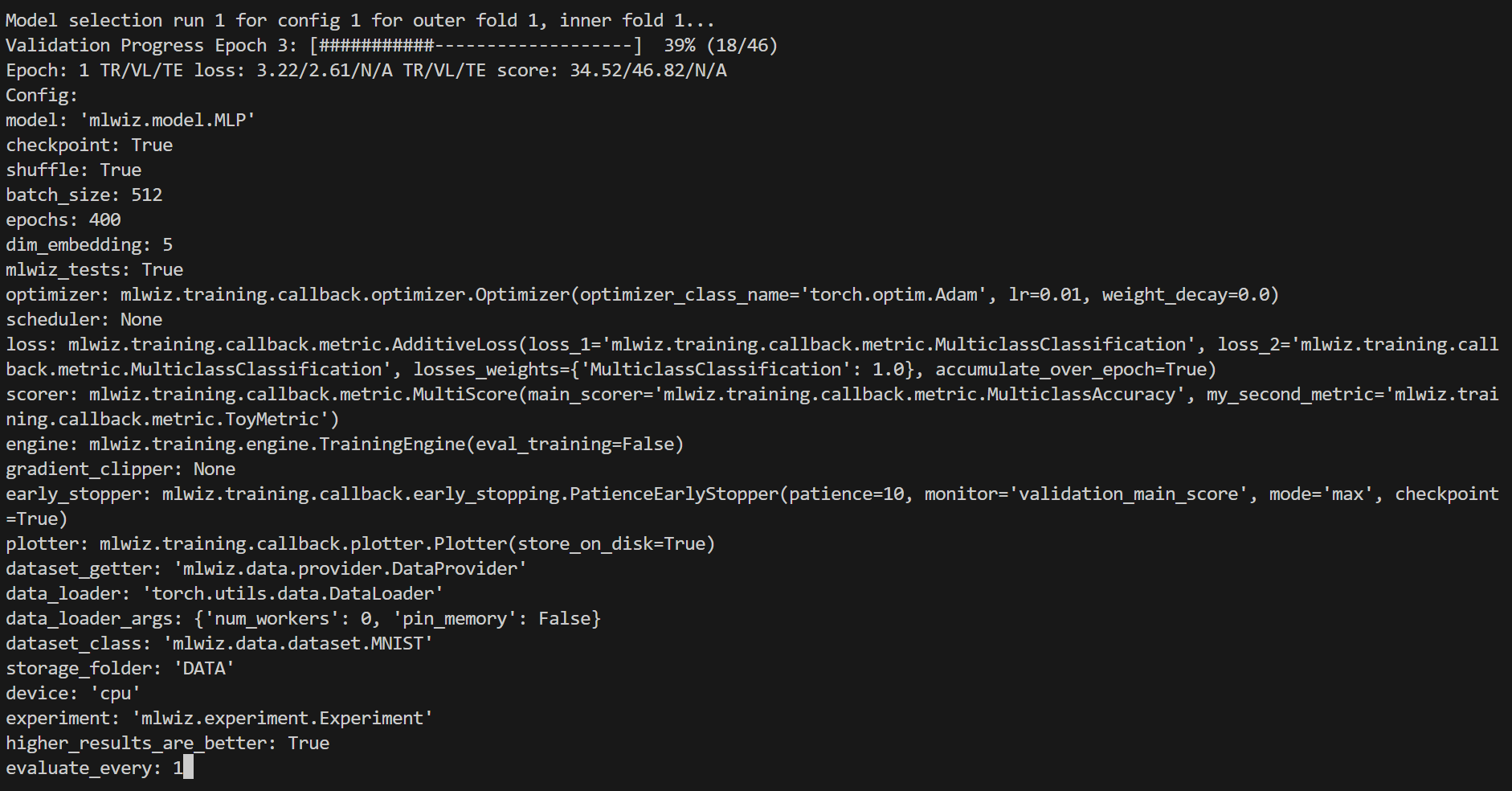
To stop the computation, use CTRL-C to send a SIGINT signal, and consider using the command ray stop to stop
all Ray processes. Warning: ray stop stops all ray processes you have launched, including those of other
experiments in progress, if any.
Useful Features to Know About
Disabling Data Splitting Automatic Checks
Since MLWiz 1.2.0, we perform automatic checks that the training/validation/test splits are not overlapping. This is useful because everytime one implements a new data splitter for their own purposes, bugs may be easily introduced. If data split overlap is intended in your use case, you can disable the data splits checks by passing the argument –skip-data-splits-check to mlwiz-data.
Duplicating Same Model Configuration File Across Datasets
You can duplicate the same model configuration file across datasets by calling mlwiz-config-duplicator –base-exp-config <base_exp_config> –data-config-files <data_config_files>” which replaces some keywords in <base_exp_config> using information contained in the dataset configuratio files.
The new files have format <exp_name>_<dataset_name>.yml and are stored in the current working directory.
Training vs Inference Data Preprocessing
You can specify a separate preprocessing to be applied to the training data vs test data. This is useful, for instance,
when you want to randomly flip training images but you don’t want to do it at validation/test time.
You can specify the functions associated with transform_train and transform_eval as strings in the dataset’s configuration file.
You can find an example above.
Evaluating on test data at every epoch
In general, there should not be the need to store test metrics across epochs. That’s because everytime we look at test data
we are implicitly affecting our judgement, so it is good practice to evaluate on the test only at the end of risk assessment runs.
This is now the default MLWiz behavior; however, if you want to log test split metrics across epochs, you can specify it
in the TrainingEngine (in the experiment configuration file) by setting the argument eval_test_every_epoch to True.
Executing a specific configuration only (debug only!)
When debugging a specific configuration, perhaps because it is crashing unexpectedly,
you can focus on its execution by passing the arguments --debug --execute-config-id [config_id]
to mlwiz-exp. Valid IDs start from 1 to the maximum number of configurations tried.
In general, this argument will prioritize the execution of a specific configuration whenever model selection is run for
an outer fold. It cannot be used together with --skip-config-ids.
Skipping a set of configurations
Sometimes, a specific configuration may take a long time to finish training, and you do not want to wait for it.
You can skip its execution during model selection (note: for all outer folds!)
by passing the argument --skip-config-ids [config_id1] [config_id2] ...
to mlwiz-exp. This will ignore the specified configurations across all outer folds and continue with the remaining
experiments. It cannot be used together with -execute-config-id.
Storing logged metrics on disk
To store epoch-wise metrics computed during training on disk, pass the argument store_on_disk: True to the Plotter
in the experiment’s configuration file. This will produce a PyTorch file called metrics_data.torch that gets updated
at every epoch. The metrics are stored in a dictionary, with separate keys for losses and scores. I am sure you’ll get
around its structure, since I am too lazy to write it here.
Loading and storing graphs
We moved to dill to save and load in-memory datasets because of some security warnings being issued by Pytorch save and load methods.
However, using dill to load and store PyG graphs appears to be extremely inefficient. Because newer versions of PyG
(>=2.6.0) define all the required safe_globals, we decided to continue using torch.save and torch.load for graphs.
Whenever you create your own graph dataset by subclassing DatasetInterface, please make sure you override the static methods
_save_dataset and _load_dataset by calling torch.save and torch.load, respectively.
Inspecting Results
According to our configuration file, the results are stored in the RESULTS folder. The hierarchy of folder is the following:
mlp_MNIST
|__ MODEL_ASSESSMENT
    |__ assessment_results.json  # contains the risk assessment results (average of the outer fold results)
    |__ OUTER_FOLD_1
    ...
    |__ OUTER_FOLD_5
        |__ outer_results.json  # contains the aggregated results of the three final runs
        |__ final_run_1
        |__ final_run_2
            |__ tensorboard  # tensorboard folder
            |__ experiment.log  # log file with profiling information
            |__ best_checkpoint.pth  # torch dict holding the "best" checkpoint information according to the early stopper used
            |__ last_checkpoint.pth  # torch dict holding the checkpoint information of the last epoch (top ``checkpoint`` keyword set to true)
            |__ run_2_results.dill  # dict holding the results of the 2nd final run on the 5th outer fold.
        |__ final_run_3
        |__ MODEL_SELECTION  # files regarding the model selection inside the 5th outer fold
            |__ winner_config.json  # contains the "best model" across the inner folds (in this case just 1 inner fold) for the 5th fold to be used in the final training runs
            |__ config_1
            |__ config_2
            |__ config_3
                |__ config_results.json  # contains the aggregated results of the K inner model selection folds
                |__ INNER_FOLD_1  # first (and only in this case) inner model selection fold
                    |__ run_1
                        |__ tensorboard
                        |__ experiment.log  # log file with profiling information
                        |__ best_checkpoint.pth
                        |__ last_checkpoint.pth
                    |__ run_2
                    |__ fold_1_results.info  # torch dict holding detailed results of the 2 runs of 3rd configuration on 1st inner fold.
                    |__ fold_1_results.dill  # dict holding summary results of the 1st fold results of the 3rd configuration, needed to compute config_results.json
                |__ INNER_FOLD_2
            |__ config_4
    ...
    |__ OUTER_FOLD_10
Profiling Information
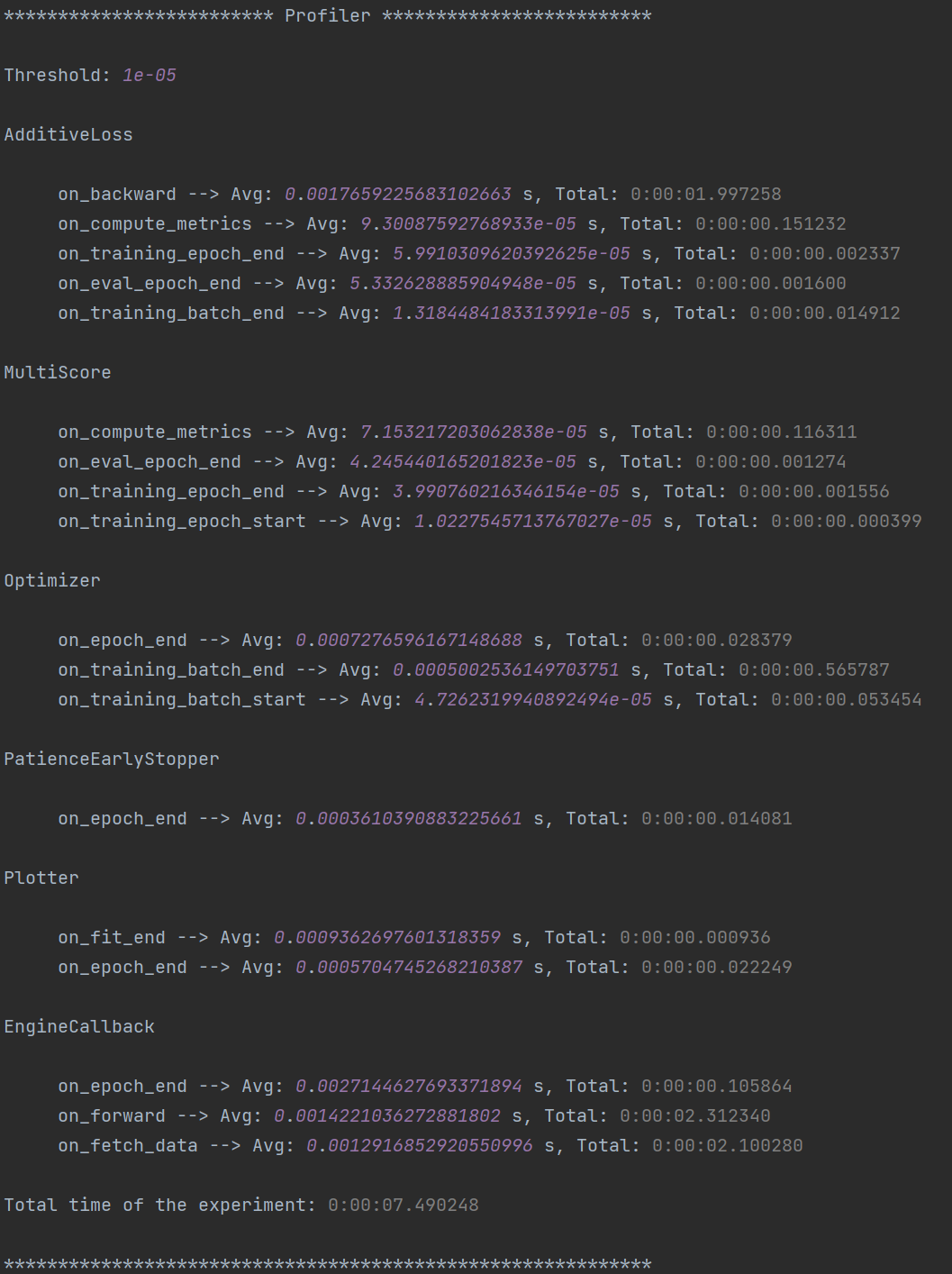
Inside each experiment.log file, you will find training logs and, at the end of each training, the profiler information
with the per-epoch and total time required by each EventHandler, provided the
time spent is non-negligible (threshold specified in the log file).
Here’s what it looks like:
Tensorboard
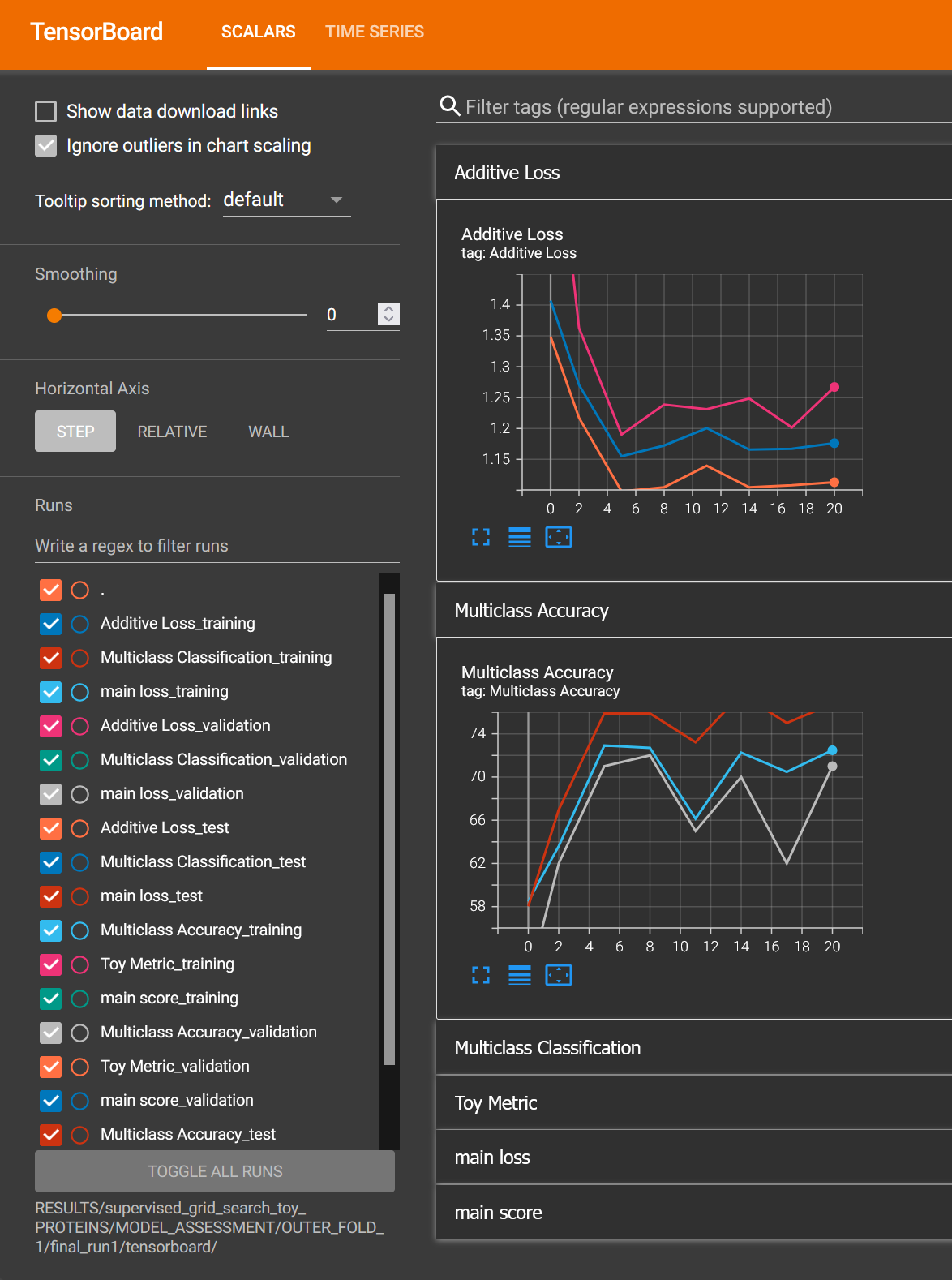
We can use the generic Plotter class to easily visualize the training trend with
Tensorboard, using the information in the tensorboard folder:
tensorboard --logdir RESULTS/mlp_MNIST/MODEL_ASSESSMENT/OUTER_FOLD_1/final_run1/tensorboard/
And we get:
Filtering Configurations for Post-processing of Results
You can use some utilities we provide to focus on a specific set of configurations after your experiments are terminated. Assuming you run mlwiz-exp –config-file examples/MODEL_CONFIGS/config_MLP.yml inside the MLWiz repo, you can then do something like
from mlwiz.evaluation.util import retrieve_experiments, filter_experiments

configs = retrieve_experiments('RESULTS/mlp_MNIST/MODEL_ASSESSMENT/OUTER_FOLD_1/MODEL_SELECTION/')
print(len(configs))  # will return 32

filtered_configs = filter_experiments(configs, logic='OR', parameters={'Multiclass Classification': 1, 'lr': 0.001})
print(len(filtered_configs))  # will return 24
Converting Results to a DataFrame for Post-processing
Additionally, if you want to convert the list of configurations to a pandas DataFrame, you can use the
create_dataframe utility. This is useful if you want to perform some post-processing of the results, such as
configs_df = create_dataframe(config_list=filtered_configs,
                              key_mappings=[("dim_embedding", int), ("num_layers", int),
                                            ("lr", float), ("avg_validation_score", float)])
You can specify the type or a function that processes the value of the key in the configuration file, so that it is ready for later plotting for instance.
Exporting Assessment Results to LaTeX
When you need a publication-ready table summarizing multiple experiments, rely on the helper located in
mlwiz/experiment/util.py. The function create_latex_table_from_assessment_results accepts a list of
(experiment_folder, model_name, dataset_name) tuples, reads the aggregated assessment JSON files, and formats them
as a LaTeX table that already includes the corresponding standard deviations.
from mlwiz.evaluation.util import create_latex_table_from_assessment_results

experiments = [
    ("RESULTS/mlp_MNIST", "MLP", "MNIST"),
    ("RESULTS/dgn_PROTEINS", "DGN", "PROTEINS"),
]

latex_table = create_latex_table_from_assessment_results(
    experiments,
    metric_key="main_score",
    no_decimals=3,
    model_as_row=True,
    use_single_outer_fold=False,
)

print(latex_table)
You can change metric_key to any metric stored in the assessment files, customize the rounding through
no_decimals, and decide whether models or datasets are rendered as rows with model_as_row. Setting
use_single_outer_fold=True is handy when the experiment only used a single outer fold and you still want the final
runs’ standard deviation to be reported in the LaTeX output.
Comparing Statistical Significance Between Models
When you need to quantify whether a highlighted model is statistically better than others, use the helper
compare_statistical_significance. It automatically chooses the right samples: if multiple outer folds are present,
it uses the outer-fold averages; otherwise it falls back to the final runs of the single outer fold. A Welch t-test
is applied with a 95% confidence level by default.
from mlwiz.evaluation.util import compare_statistical_significance

reference = ("RESULTS/mlp_MNIST", "MLP", "MNIST")
competitors = [
    ("RESULTS/baseline1_MNIST", "B1", "MNIST"),
    ("RESULTS/baseline2_MNIST", "B2", "MNIST"),
]

df = compare_statistical_significance(
    highlighted_exp_metadata=reference,
    other_exp_metadata=competitors,
    metric_key="main_score",
    set_key="test",
    confidence_level=0.95,
)

print(df)
The resulting DataFrame includes mean/std/CI for the reference and each competitor, the sample source (outer fold means or final runs), the p-value of the two-sided test, and a boolean flag indicating if the difference is significant at the requested confidence level.
Loading Model for Inspection in a Notebook
We provide utilities to use your model immediately after experiments end to run additional analyses. Here’s how:
from mlwiz.evaluation.util import *

config = retrieve_best_configuration('RESULTS/mlp_MNIST/MODEL_ASSESSMENT/OUTER_FOLD_1/MODEL_SELECTION/')
splits_filepath = 'examples/DATA_SPLITS/MNIST/MNIST_outer3_inner2.splits'
device = 'cpu'

# instantiate dataset
dataset = instantiate_dataset_from_config(config)

# instantiate model
model = instantiate_model_from_config(config, dataset)

# load model's checkpoint, assuming the best configuration has been loaded
checkpoint_location = 'RESULTS/mlp_MNIST/MODEL_ASSESSMENT/OUTER_FOLD_1/final_run1/best_checkpoint.pth'
load_checkpoint(checkpoint_location, model, device=device)

# you can now call the forward method of your model
y, embeddings = model(dataset[0])

# ------------------------------------------------------------------ #
# OPTIONAL: you can also instantiate a DataProvider to load TR/VL/TE splits specific to each fold

data_provider = instantiate_data_provider_from_config(config, splits_filepath)
# select outer fold 1 (indices start from 0)
data_provider.set_outer_k(0)
# select inner fold 1 (indices start from 0)
data_provider.set_inner_k(0)

# set exp seet for workers (does not affect inference)
data_provider.set_exp_seed(42)  # any seed

# load loaders associated with final runs of outer 1 split
train_loader = data_provider.get_outer_train()
val_loader = data_provider.get_outer_train()
test_loader = data_provider.get_outer_train()

# Please refer to the DataProvider documentation to use it properly.
# ------------------------------------------------------------------ #
Telegram Bot
Once you have a Telegram bot token and chat id, it is super easy to set up automatic reporting of the main results!
Create a file telegram_config.yml in the main project folder, and set it up like this:
bot_token: [YOUR TOKEN]
bot_chat_ID: [YOUR CHAT ID]

log_model_selection: True  # logs the best config for each outer fold (validation score)
log_final_runs: True  # logs the outcome of the final runs for each outer fold (test score)
Inside your experiment configuration file (see example in examples/MODEL_CONFIGS/config_MLP.yml), it is sufficient
to specify your telegram configuration file by adding:
# Telegram Bot
telegram_config_file: telegram_config.yml
And that’s all you have to do to start receiving messages when the model selection/final runs for a specific fold end! You will also receive a message when the experiment terminates with the test score.